ADVANCED VEHICLE TECHNOLOGIES, Inc.
Related
Technical
Information
Updated: 8 December
2017
This page contains:
J1850 Devices Listing
We have a listing of J1850 compatible devices. These include network
interface devices and devices that implement the two J1850 protocols.
Visit the J1850 Devices Page to review this
information.
CAN Information
We have a listing of CAN (Controller Area Network) information. This
includes stand alone controllers, microcontrollers, transceivers, contact
information, and lists of hardware, software, vendors, and other related
information. CAN Information (PDF 20K).
Briefing Materials
On 30 October, 1998 we gave a presentation at the SoMat User's Conference.
At that presentation our goal was to introduce the attendees to the world
of in-vehicle networks. During the briefing we covered some history, an
introduction to the OBD-II rules and standards, the OBD-II networks, other
network types, some opinions of where in-vehicle networking was headed,
and some technical details on a couple of networks. We have converted the
briefing slides to a PDF format file.
In-Vehicle Networking Briefing Slides (PDF
93K).
In-Vehicle Networking Briefing Slides with
Presenter's Notes (PDF 105K).
Frequently Asked
Questions
#1.
Do you have any USB units ??
The AVT-852 is the only USB interface I offer.
I still provide technical support for the AVT-842 (no longer in
production).
Both interfaces (AVT-842 and AVT-852) support J1850 VPW (GM Class2 with
high speed, 4X, support); CAN (2-wire, ISO 11898); and CAN (1-wire, J2411)
(also known as GM SWC - Single Wire CAN).
Refer to the Products and the
Documentation and the Price List pages
for more information about the AVT-852 interface (which
is part of the AVT-85x family).
#2.
What about using a USB to serial converter ??
For my RS-232 serial interfaces, there are any number of USB to serial
converters that may work for you.
I cannot offer any recommendations about any specific USB converter to
use - sorry.
#3.
Can you tell me what network(s) can be found in a particular vehicle ??
No, I cannot.
The network(s) that may be found in a specific vehicle vary widely
depending on manufacturer, model, and year.
I do not try to track that kind of information. It would be a monumental
task and not worth it to me.
However, ETI has been trying to do just that. I've been told their web
site has a lot of that kind of information.
Refer to the question about "E T I", below.
#4.
Can you tell me what vehicle has what network(s) ??
No I cannot.
Same reasons as in the previous question.
Refer to the question about "E T I", below.
#5.
Can you tell me what the individual pins on the OBD-II connector are
used for in a particular vehicle ??
I can only refer you to SAE specification J1962.
J1962 calls out what pins are reserved for specific uses. All other pins
are available for the manufacturer to use as they wish. I believe that the
manufacturer even has the freedom to use un-used OBD-II pins as they wish,
within some limitations (such as damage).
Refer to the question about "E T I", below.
#6.
Can you provide information on specific messages ??
No, I cannot.
I refer you to related SAE specifications such as: J1979, J2190, J2178 and
more.
Refer to the question about "E T I", below.
#7.
Who and what is "E T I" ??
E T I is the "Equipment and Tool Institute."
http://www.etools.org
ETI is the trade group that acts as the liaison between the OEMs (GM,
Ford, DaimlerChrysler, ...) and the after market manufacturers (tool
makers,
etc.).
If an OEM wants to give out information about a vehicle or function that
an after market tool maker would need to know to build something to
support the vehicle, then that information is generally released to ETI.
Companies that are engaged in designing and supplying the special tools to
support different vehicles join ETI and gain access to that special
information (sign a non-disclosure agreement).
If you are a legitimate organization in need of this kind of information,
then I suggest you check out the ETI and/or contact them about your needs.
#8.
Where can I get the specifications you talk about ??
For so-called "J" specs, "ISO specifications, and other specifications and
documents, try these sources.
I recommend shopping around a little. Prices, availability, and delivery
options (electronic or paper) may vary between the different suppliers.
These listings are not in any specific order.
http://www.sae.org
http://www.ihs.com
http://www.techstreet.com
http://www.document-center.com/
#9.
Which specification should I buy ??
If you decide to buy any of the specifications, they are expensive and it
will all add up fast.
Your best bet is to buy their publication: "HS-3000"
It contains all the related OBD-II specifications (except ISO 9141) all in
one publication. It is also affordable and a lot less expensive than
buying all the individual specifications. Go to the SAE web site and
search
on "HS-3000", after you find it, buy it, and then read it.
#10.
What kinds of messages are out there ??
Messages essentially fall into three categories.
These are: Down the Road, Manufacturer Diagnostic, and Legislated
Diagnostic.
#11.
What are "Down the Road" messages ??
These are (usually) manufacturer proprietary messages having to do with
the many vehicle functions required for the vehicle to drive "down the
road."
#12.
What are "Manufacturer Diagnostic" messages ??
These are special messages, that are proprietary, and related to any
number of diagnostic functions or features.
#13.
What are "Legislated Diagnostic" messages ??
There is a very limited set of messages and functions that were legislated
by the EPA. They are sometimes known as J1979 messages and/or OBD-II
messages. These messages are contained in SAE specification J1979. More
information may be in J2190 and other related specifications.
Note that not all vehicles are required to recognize all messages
contained in J1979 and J2190.
#14.
What is the OBD-II connector ??
Refer to SAE specification J1962.
#15.
Who makes the OBD-II connector for the vehicle ??
I know of three companies. I have listed what I know here. [I'm sure there
must be more, but I don't know of them.]
TYCO (used to be AMP)
Connector body; part number: 179631-1
Pins for this body; part number: 776001-1
Application specification: 114-2136
Delphi Packard (used to be Packard Electric)
Connector body; part number: 1211 0250
Pins for this body; part number: 1212 9373
Secondary Lock; part number (?): 1211 0251
Molex
Female body, snap-in mount; part number: 51115-1601
Female body, flange mount; part number: 51116-1601
Female pins for either body; part number: 50420-8000
Retainer for # 51115-1601; part number: 51117-1605
Retainer for # 51116-1601; part number: 51118-1605
(The retainer is probably something for the rear of the connector to hold
in the pins.)
[This information provided by a considerate associate.]
[I don't have any personal experience with this connector.]
#16.
Who makes a connector that mates to the OBD-II connector on the vehicle
?
I know of only one company that makes just the connector.
(I had trouble for years finding a source of just the connector. I
eventually had to contract with a company to custom make a mold to build
the OBD-II
cables we now sell.)
If anyone finds out someone else that makes just the connector, let me
know. I'll be glad to update this page.
Delphi Packard (used to be Packard Electric)
[I have conflicting information. Here are both part numbers.]
Connector body; part number: 1211 0256
Connector body; part number: 1211 0252
Pins for this body; part number: 1205 9894
Clip: 1211 0254
Delphi Packard
OBD-II male connector with 3 feet of cable, part number: 1214-3692
Remember that AVT sells a complete OBD-II compatible cable.
#17.
Where can I get these Delphi Parts ?
According to my old notes; a company called: Pioneer /Packard; Solon,
OH 216-349-1300 dealt in small quantities of Delphi Packard parts. I've
also been told that this phone number is for Pioneer: 1-800-610-4838;
contact
Dennis Erro at x6647.
#18.
Who makes your J1962 connector and cables ??
What if I want to buy a large quantity of your cables ??
Can you make a custom cable for me ??
If you want a custom cable or if you want a lot of cables, you don't
want to go through us.
You should contact:
Joyce at Car Link Auto Parts
joyce@automotive-cable.com
Or:
ATEK, Inc.
Attn: Dan Rothman
2911 Tech Center Drive
Santa Ana, CA 92705
714-258-0100 x 203
http://www.atek.com
drothman AT atek.com
Other possible sources for J1962 connector and cables are:
System Connection
http://www.systemconnection.com/
Multiplex Engineering
http://www.multiplexengineering.com
Elm Electronics
http://www.elmelectronics.com
Yeahui
http://www.yeahui-china.com
#19.
Does AVT do custom software for the host computer (PC and the like) ?
All AVT interface units require a connection to a host computer (PC,
laptop, etc.).
AVT does not usually do custom software for the host computer. It is not
our area of expertise.
Below are listed a number of third party companies that are very familiar
with our units and can provide better service in this area than we
probably can.
#20.
Can AVT recommend someone for custom software development ?
Yes. I know of several companies that develop and have developed custom
software for our AVT interface units.
We can recommend the companies listed below.
All are very familiar with our interface hardware and have developed
products and software using our equipment.
#21.
Can AVT repair a unit I own ?
Yes. We can repair any unit we have manufactured and sold.
Original warranty is one year from date of shipment of the unit.
If the unit is in-warranty the repair is free (parts and labor) and
shipping via UPS Ground (to domestic destinations) is included.
Sorry, but overseas customers are liable for shipping of the unit both
ways.
If the unit is out-of-warranty, the repair fee is US$ 125.00 per unit.
This includes parts; labor; testing; 6-month warranty; and shipping via
UPS Ground (to domestic destinations).
You can send in a unit for repair. Send it to our company address as
listed on our contact page. Please include a
description of the problem you have with it. Please include a name,
address, and telephone number of who and where to ship it back to and
contact if we have questions.
#22.
AVT-418 and AVT-843 Ethernet IP address problem.
Refer to this note: Find a missing
XPort and set the IP address .
Link to Lantronix to download the
XPort installation software.
Next question, please.
Third Party Resources
Companies listed below are well known system developers and
integrators that are very familiar with AVT products and use them
extensively.
Presented in alphabetic order (for no particular reason).
Advantage Electronics, Inc.
Advantage Electronics, Inc.
525 East Stop 18 Road
Greenwood, IN 46143-9808
Tel: 317-888-1946
Contact:
Steve Wash
wash "AT" advantageelectronics.com
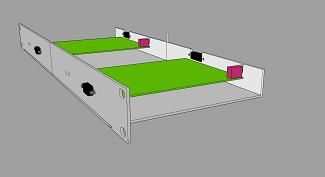
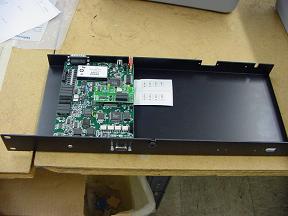
They offer a rack mount chassis for two AVT-718 boards, pictured here:
DYNE SYSTEMS, Co. LLC
http://www.dynesystems.com
W209 N17391 Industrial Drive
Jackson, WI 53037
262-677-9300 (voice)
262-677-9308 (fax)
Contact:
Dan Clapham
d_clapham "AT" dynesystems.com
LM3 TECHNOLOGIES, Inc.
Contact:
Michael Walt
mw.lm3tech "AT" gmail.com
815-762-1681(voice)
MAGNA ELECTRONICS ENGINEERING
Magna Electronics Engineering
2050 Auburn Rd
Auburn Hills, MI 48326
Tel: (248) 696-6544
ORION TEST SYSTEMS & ENGINEERING
Orion Test Systems & Engineering
4260 Giddings Road,
Auburn Hills, MI 48326
Tel: (248) 373-9097
Fax: (248) 373-9089
PTM ELECTRONICS
http://www.ptmelec.com
221 Dino Drive
Suite A
Ann Arbor, MI 48103
734-426-9010 (voice)
Contact:
Ian Cumming
ian "AT" ptmelec.com
STERNER AUTOMATION
http://www.sternerautomation.com
43 Hanna Avenue
Toronto, Ontario, Canada M6K 1X6
416-538-1826 (voice)
416-538-2876 (fax)
STOELLER AUTOMATION
http://www.stoeller.com
(they have two offices)
3520 N. Oakley Ave.
Chicago, IL 60618
773-975-3924 (voice)
773-975-3924 (fax)
Contact:
Eric Stoelinga
estoelinga "AT" stoeller.com
2 McKinley Ave.
Frankfort, IN 46401
765-654-6195 (voice)
765-654-6320 (fax)
Contact:
Dennis Miller
dmiller "AT" stoeller.com
STURGEON CONTROLS, Inc.
DOMINION TECHNOLOGIES GROUP, Inc.
http://www.dominiontec.com/
15736 Sturgeon
Roseville, MI 48066
586-773-3303 (voice)
586-773-2730 (fax)
Contact:
Paul Jackonen
WINEMAN TECHNOLOGY, Inc.
http://www.winemantech.com
1668 Champagne Drive North
Saginaw, MI 48604
Contact:
Matt Eurich
989-771-3000 (voice)
989-771-3010 (fax)
IKOHM TEST SYSTEMS
http://www.ikohm.com
Privada Manuel Acuna 285
Santa Anita, Tlaquepaque, Jalisco 45600 Mexico
Contact:
Ramon Escoto
Ramon.Escoto "AT" ikohm.com
(+52) 33 33-31-37-68 (voice)
As I learn of more companies that
offer services related to AVT products I will update this list.
If you know of someone that should be listed here, please let us know.
Site Map